Posts

Showing posts with the label Activation

Updating the product key and activating a Windows Server installation
Image
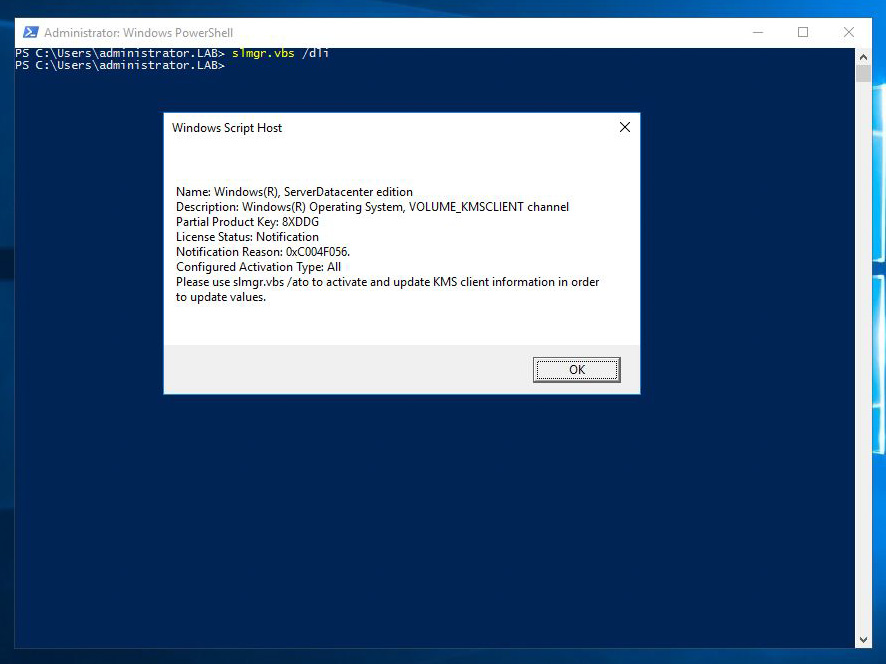
A very common task when installing a Windows operating system is to activate the license, and update the product key if required. Although this is a very simple task using the control panel, it can be tricky the command line is all you've got, just like on server core installations. The slmgr script can provide information about the license status of a server, update the product key and activate the license. Let's take a look at the parameters of the script. To get a short description of the licensing status, use the "/dli" parameter: If you need a more detailed status, you can use the "/dlv" parameter: The "/xpr" parameter displays the version of the server and the status of the activation: The "/ipk" parameter allows us to change the product key of the server: After changing the product key, we have to activate the license using the "/ato" parameter: After updating the product key...

Windows 2008 R2 Activation Period Extension

There have been many times that I needed to use a Windows 2008 R2 operating system in a virtual inveronment for testing and writting guides. But after the activation period ends you have to enter a valid serial in order to continue using the OS. In case that period has expired and you do not have the time to set up a new VM or your working on a production server that need to be activated you can just rearm it. To rearm you just have to run the command slmgr.vbs -rearm  on a command prompt with elevated priviedges. After that restart the server and you'le have 30 days left to activate. Be vary carefull because you can only do this three times... Below are some keys: Windows 2008 R2 Web: KBV3Q-DJ8W7-VPB64-V88KG-82C49 Windows 2008 R2 Standard: 4GGC4-9947F-FWFP3-78P6F-J9HDR Windows 2008 R2 Enterprise: 7PJBC-63K3J-62TTK-XF46D-W3WMD Windows 2008 R2 Datacenter: QX7TD-2CMJR-D7WWY-KVCYC-6D2YT