Posts

Showing posts with the label LDAP

Quering Active Directory using PowerShell

Image
Active Directory query. Every Windows administrator has had the need to get a list of objects using some kind of criteria to create a report or update them in one batch. Fortunatelly, Microsoft provides a PowerShell module to interact with Active Directory as part of the RSAT tools and this module is installed by default on the Domain Controllers. The commands in this module interact with the Domain Controller using the Active Directory Web Services. But what if you are not logged on to a Domain Controller or you don't have RSAT installed? There is a way to query the Domain Controller and get the information you want, without the limitations of the Web Services and in a much faster way using .NET. First, we have to create a DirectorySearcher object and configure it's LDAP filter. Calling any of the find methods will return the results for the specified filter. On the following example, I'm using FindOne() to get my account. Keep in mind that you can configure t...
Introducing the CPolydorou.ActiveDirectoryLDAP PowerShell module

I've been working with Active Directory for a very long time, even back when there was no PowerShell! Over those years, I've developed some functions to query the directory with the help of .NET and surprisingly those functions are still useful! I've decided to try to convert them to PowerShell so that the can be an addition to my Active Directory module, when the Remote Server Administration Tools are not available. For that reason, I've created and published a new module named CPolydorou.ActiveDirectoryLDAP on the PowerShell gallery. At this time, the module contains only two functions, Get-ActiveDirectoryDomainLDAP and Get-ActiveDirectoryForestLDAP . Those two return information about Active Directory domains and forests respectively. Let's take a look on some examples. Executing the "Get-ActiveDirectoryDomainLDAP" without parameters, will return information about the domain the local computer is joined to. PS C:\> Get-ActiveDire...

NetScaler InSight Center Authentication Delegation

Image
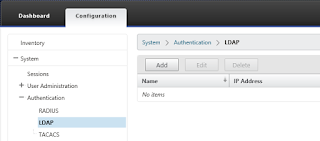
Whenever I'm called to setup or troubleshoot Citrix NetScaler performance issues, I try to bring Citrix InSight Center into the game. InSight Center is a Linux based Virtual Machine which gathers AppFlow performance data from the NetScaler thus helping with performance troubleshooting. I am not a fan of local user accounts on any system for many reasons, so I'll show you how to delegate the user authentication of the InSight Center to Active Directory. Let's start with logging on to the InSight Center using the default administrator account "nsroot" and navigating to the "Authentication" node under "System". Here we see all the available authentication methods supported: RADIUS, LDAP and TACACS. Since we want to delegate the authentication to Active Directory, we're interested in LDAP. Select the "LDAP" methods, and then click "Add" to add a server. Fill in the IP address of a domain controller (or a Load Bal...

Delegating NetScaler Administration to Active Directory Group

I often get the request to delegate the administration of NetScalers to an active directory group, particularly in very large organizations. This is very simple procedure but you should be very careful when giving permissions on such devices since a small mistake may lead to serious problems. Let's get started then... The first thing you have to do is create an LDAP server. This is the server that the authentication requests are going to be directed to. You should add more than one servers as a best practice. I always create an LDAP (and sometimes an LDAPS) vServer with all the AD Domain Controllers and use that one. So, to create the LDAP server, navigate to System - Authentication - LDAP, click "Servers" and then "Add". Fill the friendly name, IP address and port of the server (AD server of LDAP vServer) and the details about the domain and then create the server. Next, you have to create the Authentication policy, click on the "Policy" ta...