Posts

Showing posts with the label CPolydorou.General

Get the filesystem hierarchy using PowerShell
Image
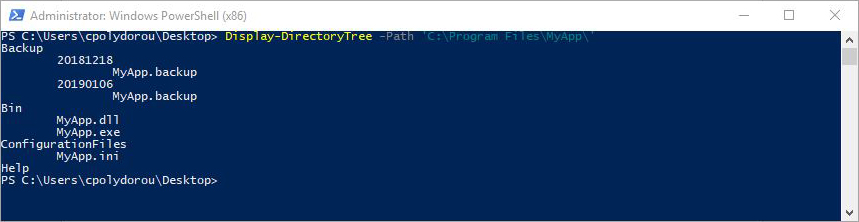
When working with command prompts - especially on systems without a graphical user interface, getting a view of the filesystem structure under a directory can be an issue. We usually have to get the files in the directory and then recursively process all it's subdirectories. When it comes to PowerShell, I've created a simple function to do exactly that. To demonstrate the usage of the cmdlet, I have created a test application under "C:\Program Files\MyApp". To get a quick look at the directory structure of the application we just have to execute: Display-DirectoryTree -Path 'C:\Program Files\MyApp\'   Each level is indented in order to provide the level feel. To display the type of each object, use the  -IncludeType  parameter. This will prefix each object with a "D" for a directory or an "F" for a file: By default, the tab character is used in the indentation of each level in the hierarchy.  You can select the string using ...

New cmdlets in CPolydorou.General v2.9.0

There is a newer version of my CPolydorou.General PowerShell module that contains two new cmdlets, Remove-Duplicate and Compare-ObjectByProperty. Let me guide you through the usage of these cmdlets. We'll start with Compare-ObjectByProperty. This cmdlet compares two objects using the values on their properties. Let's take the following csv file as example: Property1 Property2 Property3 a b c a b d e f g e f g Using the Import-Csv cmdlet we are going to save it to the "data" variable for later use: PS C:\> $data = Import-Csv -Path .\data.csv PS C:\> $data Property1 Property2 Property3 --------- --------- --------- a         b         c a         b         d e         f         g e         f         g If we compare the third and the fou...

Updates to the Foreach-Object-Parallel function

One of the most used functions of the CPolydorou.General module is "Foreach-Object-Parallel". This function allows us to execute PowerShell commands in parallel. This is accomplished by using new PowerShell runspaces and the most recent enhancement allows us to feed the runspaces with parameters. First, a quick example of the ForEach-Object-Parallel function. PS C:\> (0..5) | ForEach-Object-Parallel -MaxThreads 2 -ScriptBlock {$_; Start-Sleep -s 2} 0 1 2 3 4 5 This does not seem that much but if you execute the above command, you'll notice that the numbers appear in pairs due to the MaxThreads being set to "2". Each object passing the pipeline is being passed to the scriptblock of the Foreach-Object-Parallel function and can be accessed using the $_ variable. The issue here is that since the scriptblock is executed on another PowerShell runspace, all the variables of the original runspace are not available. Le...