Posts

Showing posts with the label Active Directory

Active Directory Domain Join Delegation
Image
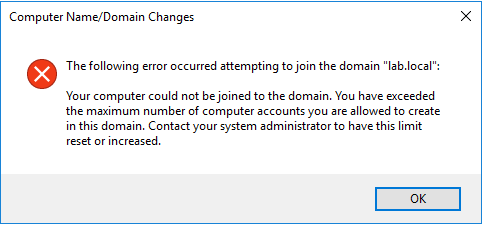
The trigger to write this article was a troubleshooting session with a client that had built an automation process to deploy Windows Server and RedHat Enterprise Linux virtual machines on Azure. One of the steps of the provisioning process was to join the machine to the IaaS Active Directory Domain that was deployed on Azure and for this, an Active Directory account was required. Following the least previlege principle, the account used in the automation processes to join machines to the domain was a plain account that could indeed perform this operation. After some successfull joins however, the process started encountering errors when trying to join machines to the domain. As it turns out, the architects and security engineers had missed the fact that plain Active Directory accounts have the ability to only join a specific number of machines to the domain. When the automation reached that number, the process started to fail. To further troubleshoot the issue, we tried to join t...

Quering Active Directory using PowerShell

Image
Active Directory query. Every Windows administrator has had the need to get a list of objects using some kind of criteria to create a report or update them in one batch. Fortunatelly, Microsoft provides a PowerShell module to interact with Active Directory as part of the RSAT tools and this module is installed by default on the Domain Controllers. The commands in this module interact with the Domain Controller using the Active Directory Web Services. But what if you are not logged on to a Domain Controller or you don't have RSAT installed? There is a way to query the Domain Controller and get the information you want, without the limitations of the Web Services and in a much faster way using .NET. First, we have to create a DirectorySearcher object and configure it's LDAP filter. Calling any of the find methods will return the results for the specified filter. On the following example, I'm using FindOne() to get my account. Keep in mind that you can configure t...

Domain Controller Machine Password Reset

Image
On my lab environment, I've configured two Active Directory sites since most enterprises have offices in more that one places. My lab however is not running 24/7 and the domain controllers in the second site are rarely turned on in order to save resources. This leads to issues with the Active Directory replication such as the "The target principal name is incorrect" error when I execute:  repadmin /syncall /AdeP. To remedy the issue, we have to reset the machine password of the domain controller that has been offline. First off, we are going to stop and disable the Kerberos Key Distribution Center (kdc) service on the problematic domain controller, in our case DC4. There may be some tickets in the cache so we should also clear them using klist purge Now it's time to change the machine password of the domain controller using the command netdom resetpwd /s:dc3 /ud:lab\administrator /pd:* Replace the "lab\administrator" with an account on your...

How To Join a CentOS 7 machine to an Active Directory domain

Image
Joining a linux machine to an Active Directory domain is an uncommon task, but I have run across it a few times. The increasing popularity of linux will sooner or later attract more windows administrators and users and more machines will be joined to Active Directory domains. Back in the day, to join the domain we had to do a lot of configuration file editing, many packages that had to be aligned and a lot of luck was a requirement! Fortunately, this process has been reduced to a handfull of commands! Let's see it in action. The first step is to install the necessary packages. yum install sssd realmd oddjob oddjob-mkhomedir adcli samba-common samba-common-tools krb5-workstation openldap-clients policycoreutils-python -y Give it some time to download and install the packages and their dependencies and you should end up with something similar to the below: Another requirement is that the machine has to be able to resolve the domain DNS records. Check your  /etc/...

How to Configure Message Forwarding on a Mailbox Level

Image
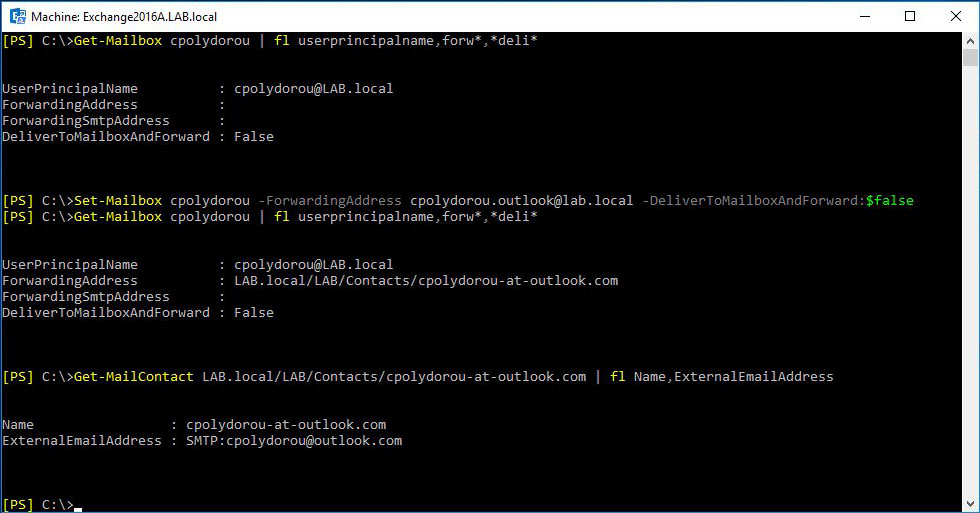
The Set-Mailbox cmdlet has two parameters to configure forwarding for a mailbox: ForwardingAddress and ForwardingSmtpAddress. Those two parameters serve the same puspose but in two different ways. There is also a third parameter called DeliverToMailboxAndForward that when set will leave a copy of the message on the mailbox. The "ForwardingAddress" accepts RecipientIdParameter input which means that you have to use the identity of an existing object on your organization such as another mailbox or a mail contact. The "ForwardingSmtpAddress" accepts input in a proxy address format such as plain old email addresses. Although this is pretty straight forward, there's a catch you need to be aware of. This will only work if the remote domain of the recipient is configured to allow message forwarding. Let me elaborate. There's a thing on Exchange, called Remote Domains . Those are used in order to define settings for the communication between your Exchange ser...

Monitoring Active Directory Health using OMS

Image
Following the last OMS article about the update management solution, I would like to show you two more, this time about Active Directory. The Active Directory Health Check solution provides information on many aspects of your Active Directory environment such as Security, Compliance, Business Continuity and Performance. Each group performs a number of checks against the logs, to find possible issues. Good news, apart from the backup issue, my AD is looking great!!! The second solution I'm using for Active Directory is AD Replication Status. It examines the domain controller logs and provides useful insights on the health of the replication of your Active Directory environment. I've left the DC4 domain controller on my lab disconnected from the network on purpose in order to create replication issues. Replication between DC3 and DC4 is broken, since the servers hadn't communicated for a while. Those two solutions can save you from a lot...

Introducing the CPolydorou.ActiveDirectoryLDAP PowerShell module

I've been working with Active Directory for a very long time, even back when there was no PowerShell! Over those years, I've developed some functions to query the directory with the help of .NET and surprisingly those functions are still useful! I've decided to try to convert them to PowerShell so that the can be an addition to my Active Directory module, when the Remote Server Administration Tools are not available. For that reason, I've created and published a new module named CPolydorou.ActiveDirectoryLDAP on the PowerShell gallery. At this time, the module contains only two functions, Get-ActiveDirectoryDomainLDAP and Get-ActiveDirectoryForestLDAP . Those two return information about Active Directory domains and forests respectively. Let's take a look on some examples. Executing the "Get-ActiveDirectoryDomainLDAP" without parameters, will return information about the domain the local computer is joined to. PS C:\> Get-ActiveDire...

Managing Active Directory User Certificates using PowerShell

I first came across user certificates when I was working with email certificates a few years ago and I have to admit that I had trouble updating the certificates on the objects! Most organizations have a Microsoft Active Directory Certification Authority that issues the certificates used internally. When a certificate is issued to a user, the Microsoft Certificate Service saves the public key in Active Directory. The userCertificate attribute is a multi-valued attribute that contains the DER-encoded X509v3 certificates issued to the user. Although we rarely need to pay attention to this attribute, there are cases where we have to update it. To make things easier, I've written PowerShell functions to Get, Remove, Import and Export the certificates on that field. To get the list of certificates for an object, use the Get-ActiveDirectoryObjectCertificate function: PS C:\> Get-ActiveDirectoryObjectCertificate -UserPrincipalName cpolydorou@lab.local DistinguishedName  ...

Active Directory Group Membership Recursively

A few days ago, I published an article on how to use the "Get-ActiveDirectoryGroupMember" function to get all the objects that are members of a group recursively. With this article, I'm going to show you how to use the "Get-ActiveDirectoryMembership" function in order to get all the groups that an object is a member of  recursively. As always, my user account will be the test subject! When I get the groups that I am a member of, the list contains only the groups that I am a direct member. PS C:\> $user = Get-ADUser cpolydorou PS C:\> Get-ActiveDirectoryGroupMembership -Identity $user.DistinguishedName Name                    DistinguishedName ----                    ...

Get Active Directory Group Members Recursively

A very common scenario when assigning permissions is having nested security groups. Although this is an easier way to manage the permission delegation, is adds complexity when there's the need to determine whether a principal is granted the permission or getting a list with all the principles involved. The CPolydorou.ActiveDirectory module now includes a function that is the solution to the problem. The Get-ActiveDirectoryGroupMember function will return all the objects that are members of a specified Active Directory group. The "-Recurse" parameter will query Active Directory and return all the members of the group recursively. This way, we are able to get a list of all the objects that are granted a permission without having to consider the nested groups. Let's take a quick look at an example. We have a group named "NestedGroup" that the user CPolydorou is a member of. This group is also a member of another group named "Group". PS C:...

Restoring Active Directory Attributes with PowerShell - Part 3

Welcome to the third and final article of the Restoring Active Directory Attributes with PowerShell. Today we are going to create a scheduled task in order to execute a PowerShell script that will manage our Active Directory snapshots. First, we are going to create the script that will manage the snapshots but in order to do that we have to decide on how often and how many snapshots we want to have. Personally, I go for two snapshots per day for a period of three days, nut I have these snapshots spread across multiple Domain Controllers. The following script will create an Active Directory snapshot and then remove all the older snapshots keeping a total of 3. That way, when it is executed on a daily basis, you will have three snapshots for the last 3 three days. # Create the new Active Directory snapshot New-ActiveDirectorySnapshot # Get the current date $now = [DateTime] :: Now # Remove snapshots older than three days from now Get-ActiveDirectorySnapshot |...

Restoring Active Directory Attributes with PowerShell - Part 2

Image
On the first article of the series, we used the ntdsutil tool to create, mount, dismount and remove Active Directory snapshots and load the Active Directory database using the dsamain tool. Today, we are going to use a set of PowerShell functions I've created for this purpose. These functions are included in my Active Directory module since version 1.4.1 . Let's start by creating an Active Directory snapshot and then mount it on port 33389: After taking the snapshot, I updated the first name, last name and proxy addresses attributes on my user in order to compare and later on restore them. Using the "Get-ADUser" cmdlet we can get current the values for those attributes and as well as the values from the snapshot: As you may notice, a proxy address is missing, the first name has been updated to "Christos 1" and the last name have been updated to "Polydorou 2". This is how easy it is to restore the attributes! First we save the produ...

Restoring Active Directory Attributes with PowerShell - Part 1

Image
Active Directory Recycle Bin. Great Feature. But what happens if instead of deleting the object, some of the attributes are misconfigured? Enter Active Directory snapshot. In the first article of the Restoring Active Directory Attributes with PowerShell we are going to talk about Active Directory snapshots and later on we are going to see how to restore attributes on objects. So, what is an Active Directory snapshot? It's actually an VSS snapshot of the volume that the Active Directory database resides on. And how can we use that snapshot? We can use it as a backup, a way to avoid full replication when installing a Domain Controller on a remote site and may other ways but we are going to focus on mounting it and using dsamain in order to load the database and access live. Let's see some examples on how to create such a snapshot. Of course, you need to have the appropriate rights, like domain or forest administrator. To create a snapshot, we are going to use the ntdsutil e...