Posts

Showing posts with the label Azure Table Storage

Monitoring Hosts and Domains for RBL Listing Using Azure - Part 3: Management

Image
Following my last post about monitoring your domains and hosts for RBL listing, we are going to continue with the PowerShell module to manage the solution and a script to query the status of hosts and domains. Since the solution is accessible via HTTP, it couldn't be simpler to manage using PowerShell. But first, let's take a look at the files in the module. The module is comprised of three files, the module manifest (.psd1), the script file (.psm1), and a configuration file (.json). The manifest contains the module parameters and configuration, the script file the code of the functions, and the configuration file a couple of settings such as the URL of the function app and the key to use. We'll talk about key management later in this article. The module contains the following functions: List related Get-AzureRBLList Add-AzureRBLList Remove-AzureRBLList Host related Get-AzureRBLHost Add-AzureRBLHost Remove-AzureRBLHost Check-AzureRBLHost Domain related Get-AzureR...

Monitoring Hosts and Domains for RBL Listing Using Azure - Part 2: Deployment

Image
In the previous post of the series ( here ), we went through the design of a solution to help monitor host and domain listing in RBLs. In this article, we'll go through the process of deploying and configuring the required resources on Azure. To deploy the solution to your Azure subscription, you have to perform two tasks: Deploy the Azure resources, that is the Storage Account and a Function App Deploy the Azure Function App application code To deploy the Azure resources, you have to submit an ARM deployment task using the ARM template file saved in the repository ( here ). There are two ways to create a deployment using this file: Deploy to Azure button   The main repository page contains a button that opens the Azure portal and prompts for parameters for the deployment: Leaving the default values will result in a deployment in the same location as the resource group and randomized resource names. ARM File Deployment The other way to deploy an ARM file is to use the Azure Powers...

Monitoring Hosts and Domains for RBL Listing Using Azure - Part 1: Design

Image
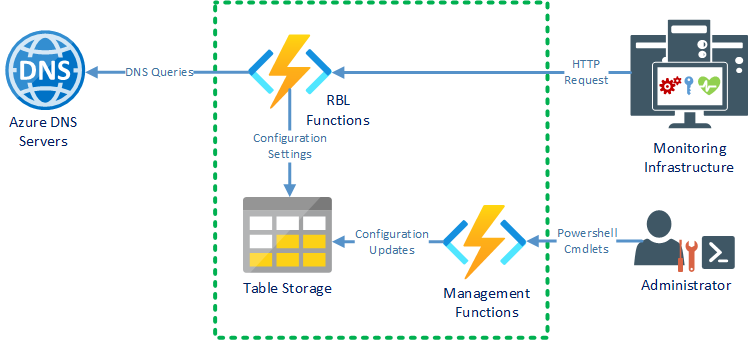
The thing that prompted the publishing of this series of posts is a recent case of a customer with a large mail platform. The Mail Transfer Agents handling the internet mail flow for such a platform are usually susceptible to being flagged as malicious on RBLs, causing issues with mail flow. The solution described in these posts helps monitor the status on the RBLs and trigger alerts in service management systems, using modern cloud application development techniques. But wait, what is an RBL? A Real Time Block list is a service that keeps track of the domain and/or the IP address of the hosts reported to be sending SPAM or malicius messages. RBLs are actual DNS zones where IP addresses or domain names are represented by A records. Let's take a list, say rbl.example.net, for example. To check if the host with IP 100.101.102.103 is listed we have to query the DNS for the host 103.102.101.100.rbl.example.net. If there is no such host known (the responce is NXDOMAIN) the host ...