Posts

Showing posts with the label Azure

How to query Azure APIs using PowerShell
Image
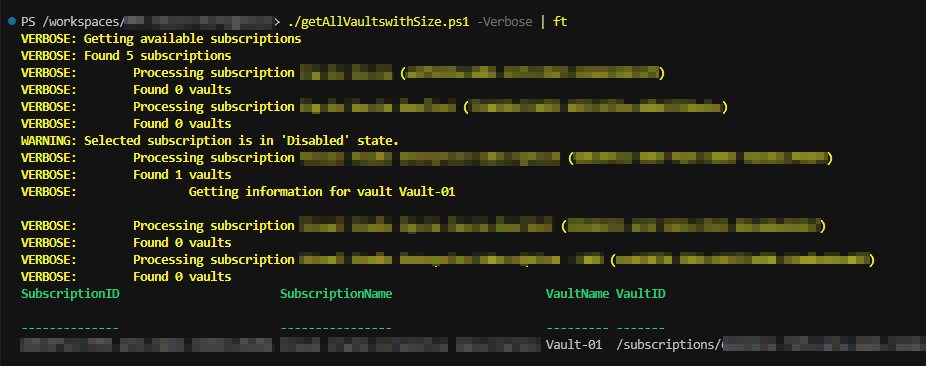
Azure REST APIs are a great way to manage your Azure resources. You can use them to create, update, delete, and list resources, as well as get information about them. In many cases, the tools provided by Microsoft - like Azure CLI and Azure PowerShell, do not provide the functionality you need and thus you have to turn to the APIs. As an example, we're going to create a script that will get the size of the storage consumed by Recovery Services Vaults, that is available in Azure Portal but not in the command line tools. So If you have a lot of vaults and you need the size of the storage behind them, you need to automate the process using the Azure APIs. Below is the entire script, but don't dive right in, let's take it a step at a time! 1 2 3 4 5 6 7 8 9 10 11 12 13 14 15 16 17 18 19 20 21 22 23 24 25 26 27 28 29 30 31 32 33 34 35 36 37 38 39 40 41 42 43 44 45 46 47 48 49 50 51 52 53 54 55 56 57 58 59 60 61 62 63 64 65 66 67 68 69 70 71 72 73 74 75 76 77 78 79 8...
Controlling Network Access in AKS using Network Policies

Image
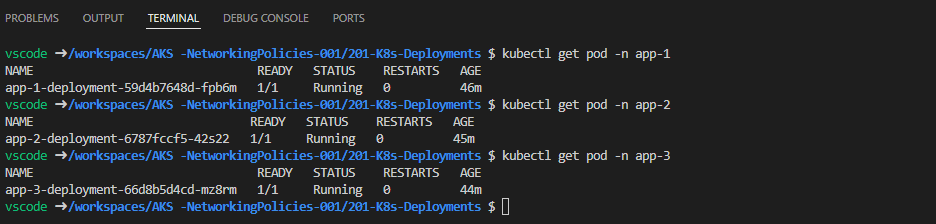
One of the very first problems when starting to deploy workloads in Azure Kubernetes Service is the segregation of the network. By default, all pods are part of the same network and can communicate with each other. In the majority of the cases, however, we want to restrict network access between pods, namespaces, applications, etc. Fortunately, K8s provide a way to easily control network traffic, called Network Policies . There are two types of policies that can be applied to a pod, Ingress and Egress. Ingress-type policies control the traffic inbound to the pod, whilst egress control the traffic outbound from a pod. In this post, we're going to work only with ingress-type policies since the configuration and principles are pretty much the same, it's just the direction that changes. To demonstrate the use of policies, we are going to be using three namespaces and each namespace will contain a deployment with containers that respond to ping requests and also contain the ping uti...

Protecting AppService using Front Door

Image
Starting with the fact that every web application should be protected by a Web Application Firewall (WAF) and accelerated using a Content Delivery Network (CDN), combined with the simplicity of the deployment of the Azure Front Door service, gives you no excuses for not protecting your apps! In this blog post, we're going to deploy an AppService and protect it using Azure Front Door. For the purposes of this demo, we're going to use the NodeJS - RequestInformation app that is available in my Github repo over  here . This application provides information on the platform and incoming requests that is going to be very handy later on. To deploy the demo resources, you just have to clone this repository, change to the  FrontDoor-AppServiceBackend-001/101-Bicep-Templates/900-IaC-FullDeployment-001 directory, and execute the deploy.sh script. The script will create a subscription-level deployment that will deploy an AppService (including the plan) and an Azure Front Door. Make su...

High Performance K8s Storage with Rook & Ceph

Image
Modern applications are usually developed with cloud-native principles in mind, there are however some that may have particular requirements in terms of storage. When developing for containers, the need for a ReadWriteMany storage may arise, which may turn into a problem when cloud services fail to match the requirements, especially the ones related to performance. One of the solutions to this problem is the Rook - Ceph combination. Ceph is an open-source software-defined storage platform that implements object storage on a single distributed computer cluster and provides interfaces for object-, block- and file-level storage. Rook, on the other hand, helps perform all the administrative tasks such as deployment, configuration, provisioning, scaling, and more. A multi-zone AKS cluster is the perfect home for Rook and Ceph. The cluster is spread across three data centers and so is the data handled by Ceph. This increases the SLAs of the services running on the cluster and at the same...

Using Loops in Bicep

Image
I've been using Azure to test virtual machines and applications for quite a few years now and I've realized that although I mostly use two or three solution templates - like an Active Directory environment for example - in the majority of the cases I need more server or client machines. This is the main reason I decided to adjust my deployments and include loops so that I can control the number of machines using parameters and variables. In this post, I'll describe how I've used loops and hopefully how you can benefit from them. I'm a big fan of organizing resources in modules, so all of the examples will be based on a deployment of virtual networks and virtual machines from a main bicep file using the respective modules, one for each resource type. Multiple Resources/Modules Since we're talking about modules, what could be better than having the ability to deploy the same module multiple times! The first thing we need is a variable that will hold the custom fie...

Citrix ADC Deployment using Bicep

Image
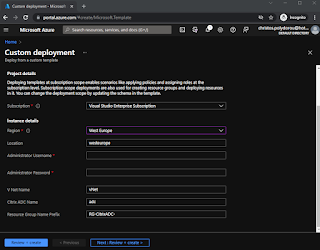
Citrix ADC (formerly NetSceler) is, without doubt, one of the top enterprise Application Delivery Controllers on the market and the preferred solution for many organizations. It is offered in many different form factors, from physical to virtual appliances and even containers. Citrix ADC is also available on Azure, which makes it ideal not only for experimenting and getting to know it better but also for using it to publish applications and services. I've created a bicep template to serve as a starting point so that you can easily create an instance and get to know the resources required. The main template creates a subscription-level deployment that separates the resources into different resource groups. The resources to be deployed include: virtual network network security group network card public IP virtual machine Going through the bicep files, we have a main template file ( main.bicep ) that uses two separate modules to deploy the vNet ( vnet.bicep ) and the ADC ( adc.bic...

Running Azure CLI in WSL Ubuntu

Image
Microsoft's Windows Subsystem for Linux is starting to gain a lot of my respect lately, not only because I can run my docker container engine on it, but due to the fact that the most popular Linux distributions are also available as images to be imported.  As you can imagine, having a Linux environment as an app within Windows can be very helpful. Especially when the drives of the system are also available from within the distribution! One of the most common problems I run into and I've managed to solve using WSL is running bash scripts for Azure CLI. In the majority of the cases, I use VS Code and the remote container extension to deploy resources using Azure CLI, but there are times I want to test different versions of it, including beta releases. The solution? Separate instances of Ubuntu on WSL! Below are the steps to import Ubuntu and then install Azure CLI. First, we need to add a new Ubuntu instance to WSL. The Ubuntu cloud images are published on the Ubuntu website  an...

Querying Azure Resource Graph for Resource Configuration Changes

Image
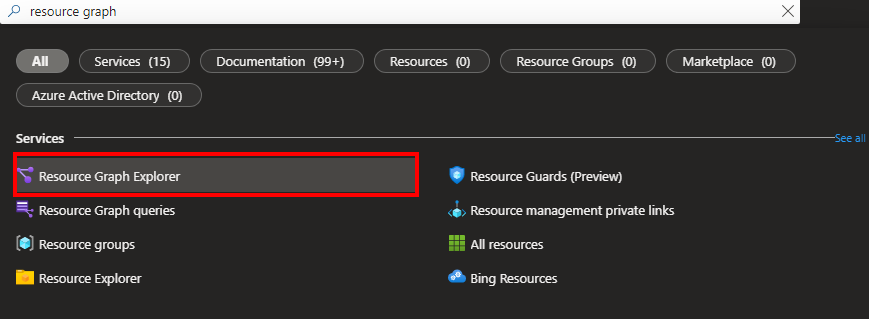
Azure's Resource Configuration Changes feature has been in public preview for a few days now and I thought we should give it a try and see what it has to offer! Resource Configuration Changes aims to provide more information on changes applied to Azure resources through Resource Graph Explorer.  If you search for "Resource Graph" in the Azure Portal search, one of the results will be Resource Graph Explorer: The look and feel of the Resource Graph Explorer is pretty similar to Log Analytics workspaces: On the left, we have the tables we can query and in the middle is the well-known query window, where we type and execute our queries. To get information about the changes that have been applied to Azure resources, we'll be querying the  resourcechanges namespace: We can see the available properties to query against by starting with a simple where  clause. Let's get all the changes in a specific subscription: As you can imagine, this query will return a very large d...