Posts

Showing posts with the label NetScaler

Exchange Original Client IP on IIS Logs

Image
Hi, Today I'm going to write about a project I was recently involved with that involves Microsoft Exchange server and Citrix NetScaler. One on the most common scenario when load balancing Exchange servers - and any other website as a matter of fact - is that on the web server logs, the IP of the client is not the IP of the machine that makes the requests but the IP of the load balancer instead. This is normal since the connections from the clients are terminated on the load balancer and not the web server. The load balancer opens new connections towards the web servers in order to serve the request. Lets take the following architecture for example. The connection from Client1 will be terminated on the Load Balancer and then the Load Balance will create a new connection to the Server2 server. Since the connection to the web server is initiated from the load balancer, the load balancer's IP will be the client IP as far as the web server is concerned. There are two pos...
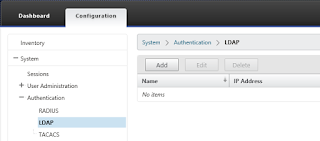
NetScaler InSight Center Authentication Delegation

Image
Whenever I'm called to setup or troubleshoot Citrix NetScaler performance issues, I try to bring Citrix InSight Center into the game. InSight Center is a Linux based Virtual Machine which gathers AppFlow performance data from the NetScaler thus helping with performance troubleshooting. I am not a fan of local user accounts on any system for many reasons, so I'll show you how to delegate the user authentication of the InSight Center to Active Directory. Let's start with logging on to the InSight Center using the default administrator account "nsroot" and navigating to the "Authentication" node under "System". Here we see all the available authentication methods supported: RADIUS, LDAP and TACACS. Since we want to delegate the authentication to Active Directory, we're interested in LDAP. Select the "LDAP" methods, and then click "Add" to add a server. Fill in the IP address of a domain controller (or a Load Bal...

Delegating NetScaler Administration to Active Directory Group

I often get the request to delegate the administration of NetScalers to an active directory group, particularly in very large organizations. This is very simple procedure but you should be very careful when giving permissions on such devices since a small mistake may lead to serious problems. Let's get started then... The first thing you have to do is create an LDAP server. This is the server that the authentication requests are going to be directed to. You should add more than one servers as a best practice. I always create an LDAP (and sometimes an LDAPS) vServer with all the AD Domain Controllers and use that one. So, to create the LDAP server, navigate to System - Authentication - LDAP, click "Servers" and then "Add". Fill the friendly name, IP address and port of the server (AD server of LDAP vServer) and the details about the domain and then create the server. Next, you have to create the Authentication policy, click on the "Policy" ta...

NetScaler Management Login Log

I recently visited a client and started doing some health checks on the NetScaler pair they're using. Among other messages I got a message that a user was trying to log in to the appliances using SSH. The message on the Command Center did not provide any information about the source of the attemts, only the username used. Since these attempts were about fine a day and at certain times of the day, I realized that it should be some kind of monitoring tool. But I had to get the IP of the source in order to investigate further... The first few searches did not yell any results since they were all related to the AAA servers that could be set up on the NetScaler. I then decided to search within the BSD system logs and put the NetScaler logs aside. You can find the login attempts, for the NetScaler system, by reviewing the log file located at /var/log/auth.log I found the IP of the source there and it was a monitoring tool!

NetScaler StoreFront Request Error

We started a Citrix XenDesktop 7.1 installation today and I was the person responsible for the Citrix NetScaler appliances. In that case I had to setup two NetScaler VPX 10 appliances as a High Availability pair, load balance Storefront servers and DDCs and publish the applications and desktops using NetScaler Gateway. I started by downloading the appropriate VM for Hyper-V, created a VM using the vhd (I could not import the VM in Hyper-V 2012 R2 because it was exported from older version of Hyper-V) and then created a clone for the second node. I assigned IP addresses, uploaded license files and created an initial checkpoint of the VMs. I didn't update the firmware cause it was already at the latest version. After that I created the servers for the StoreFront and DDCs and then the Service Groups and the Services on each group. I also load balanced the company's Active Directory servers for the authentication. Then I created the virtual servers, the monitors and the ...