Posts

Showing posts with the label Certificate

Additions to the CPolydorou.Security Powershell Module

This post has been triggered by a project that I'm currently working on that involves nginx and containers. As part of the nginx configuration, I had to create a certificate key pair that was going to be used in order to secure traffic towards nginx. The challenge I faced was to convert the PFX certificate that was handed to me by the Certificate Authority team to the format nginx understood. Considering that this was a process that I'd followed many times in the past (and also blogged about), I decided to update a Powershell module of mine named CPolydorou.Security in order to make the use of OpenSSL friendlier to the Windows administrator.  The four new functions that are included in the latest version ( 1.2.0 ) are: Export-ServerCertificateFromPFX Export-CertificateChainFromPFX Export-PrivateKeyFromPFX Decrypt-PrivateKey Let's go through them one-by-one to see how they can help! For the examples demostrated below, I've created secure string objects for the passphras...
Updating Exchange Server Certificates

Microsoft Exchange is one of the applications that's installed on almost every company's IT infrastructure and as all applications should, it uses SSL to secure network communications. SSL uses certificates and sooner or later they all expire. Below is the process I usually follow when updating the certificates on multiple servers. We'll start by creating a variable that will hold the thumbprint of the new certificate: $newCertificateThumbprint = "3A5F93553E8346618131DA97CAE6E3962C266608" Then we are going to copy the pfx file to all the servers: $servers = Get-MailboxServer | % Name | Sort-Object $servers | %{ $destination = '\\' + $_ + '\c$\Temp\' Copy-Item -Path "C:\Temp\Cert\Certificate2019.pfx" -Destination $destination -Verbose } Now that the pfx is available on all servers, we are going to import it to the local computer certificate store using the below command: Invoke-Comman...

IIS Client Certificate Revocation Check Disable

Image
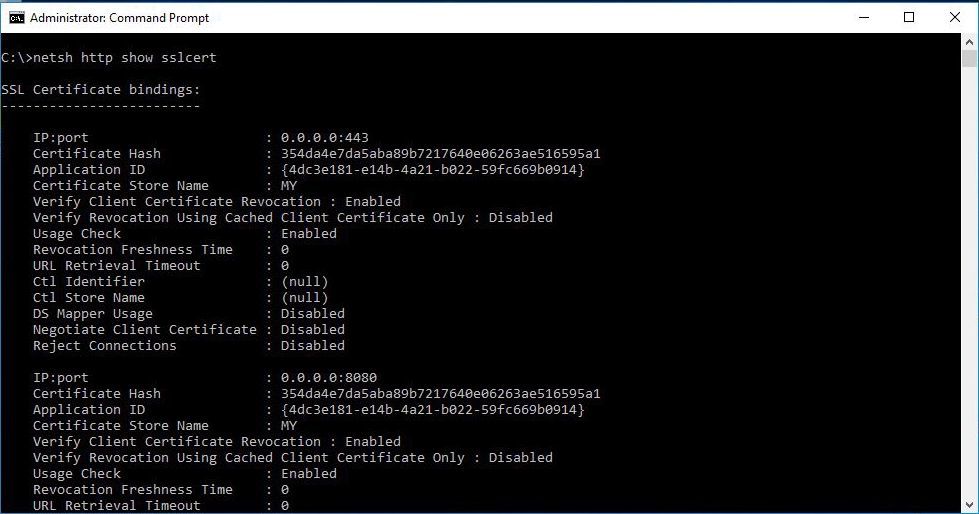
A couple of weeks back, a certificate was approaching it's expiration date on an IIS server and the update - although pretty straight forward, caused a major issue for the service running on that server. I had the new certificate in PFX format, I've installed it on the computer certificate store and it was available in the IIS Manager console. All the certificates for the Root and Intermediate authorities were property installed and the clients had access to the CRL urls. However, when I switched the certificate, the clients were not able to communicate property with the website. After going through the logs on the clients and the application, I discovered that the clients were using client certificates in order to authenticate and the validation process was failing for those certificates since my server could not check their revocation. I opened up a command prompt to get more information on the bindings on the website since there are settings that are not available when...

Converting Certificates using OpenSSL

Image
Certificates are an integral part of every IT infrastructure and service since they can be used to encrypt data, secure the communications, verify identities and provide trust. In this article I'm going to demonstrate a number of conversions you may have to perform in order to prepare a certificate to be imported to a system. Before moving on to the actual part about the conversion, a few words about the certificates and their file extensions. Encodings There are two different kinds of encoding for an X509 certificate, DER and PEM. DER encoded files are binary in contrast to PEM which are Base64 encoded and human readable. File Extensions The most commonly used file extensions for certificate and key files are: .crt - Used for certificates in DER or PEM format. .cer - Also used for certificates, alternative to crt .key - Used for private key files .pfx - Used for certificate and private key bundles. Used different format from the others (pkcs12) Conversion When it co...

Configuring a Certificate on Exchange Receive Connector

Today's article is about configuring Exchange receive connectors with specific certificates. Out of the box, Exchange uses self signed certificates to provide TLS secured mail flow. This will definitely be an issue if you expose the SMTP protocol to client computers since they won't trust the certificate. In this article we are going to configure a certificate that was issued by a third part authority to the Client Frontend receive connector. We'll start with getting the thumbprint of the certificate using the Get-ExchangeCertificate cmdlet: [PS] C:\> Get-ExchangeCertificate Thumbprint                               Subject ----------                               ------- 241B864DC82C664FECBA18B8D54987AAFB65B4C2 CN=*.lab.com, ... D4D210886B34E690191A1F008C78FDD0E7325DD4 CN=Exchange2013A 960171662EB26116...

Managing Active Directory User Certificates using PowerShell

I first came across user certificates when I was working with email certificates a few years ago and I have to admit that I had trouble updating the certificates on the objects! Most organizations have a Microsoft Active Directory Certification Authority that issues the certificates used internally. When a certificate is issued to a user, the Microsoft Certificate Service saves the public key in Active Directory. The userCertificate attribute is a multi-valued attribute that contains the DER-encoded X509v3 certificates issued to the user. Although we rarely need to pay attention to this attribute, there are cases where we have to update it. To make things easier, I've written PowerShell functions to Get, Remove, Import and Export the certificates on that field. To get the list of certificates for an object, use the Get-ActiveDirectoryObjectCertificate function: PS C:\> Get-ActiveDirectoryObjectCertificate -UserPrincipalName cpolydorou@lab.local DistinguishedName  ...