Posts

Showing posts with the label Windows Server

Updating the product key and activating a Windows Server installation
Image
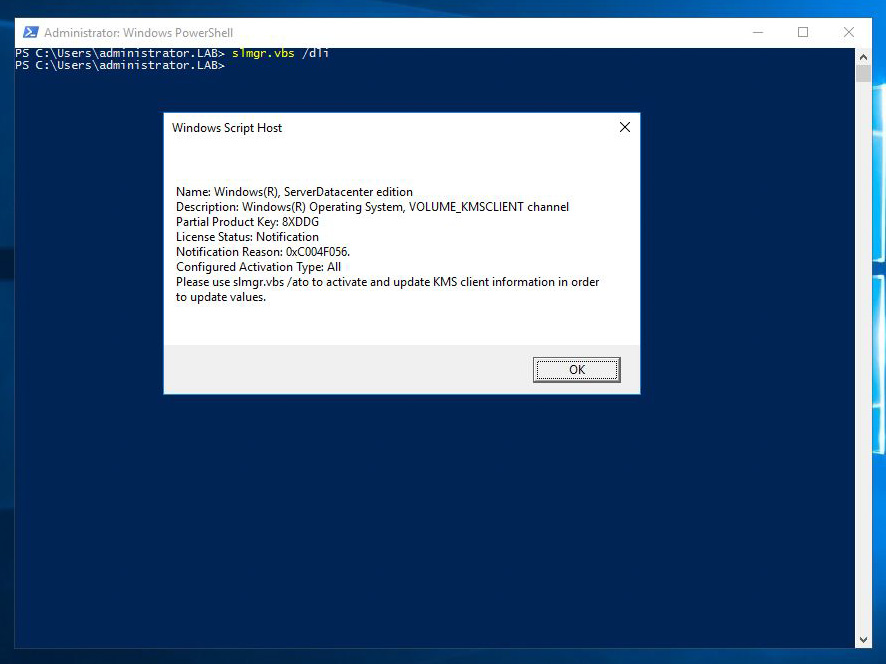
A very common task when installing a Windows operating system is to activate the license, and update the product key if required. Although this is a very simple task using the control panel, it can be tricky the command line is all you've got, just like on server core installations. The slmgr script can provide information about the license status of a server, update the product key and activate the license. Let's take a look at the parameters of the script. To get a short description of the licensing status, use the "/dli" parameter: If you need a more detailed status, you can use the "/dlv" parameter: The "/xpr" parameter displays the version of the server and the status of the activation: The "/ipk" parameter allows us to change the product key of the server: After changing the product key, we have to activate the license using the "/ato" parameter: After updating the product key...

Windows Server 2012 R2 Evaluation Upgrade

Image
Sometimes you just have to fire up a Windows Server system in order to test something and if you're like me, you'll create a new virtual machine for this purpose. Most of the times, I create a VM using an evaluation copy of Windows Server since the evaluation period is more than enough and the client may not have the necessary license. There are times however when I had to license an evaluation copy! So, let's cut to the chase! I used the DISM tool to get the current edition of the OS and the supported target editions and perform the upgrade. Start by opening an elevated Powershell window and run the command: dism /online /get-currentedition   From the output you can see that the server is running ServerStandardEval edition.   Let's get the supported upgrade editions by running:   dism /online /get-targeteditions     and since ServerDatacenter is supported, will upgrade to that using:   dism /online /set-edition...

Windows Server DHCP Migration

With Microsoft Windows Server 2003 End Of Live coming up in a few months, a growing number of companies start to examine the migration plans. Most times the DHCP in installed on the 2003 server and has to be migrated. In case you do not have a complicated DHCP configuration with many reservations or options it may be easier to just install the DHCP role on the new server and configure it from scratch. You should be very careful though when having both servers active because this will result in IP conflicts. To avoid conflicts I use exclusion ranges. I just exclude let's say half of the IPs from one server and the other half from the other. Even after that, there might be conflicts also because there might be clients that have already got an IP from the range that you excluded on the old server. Thus you should wait for a period of time longer than the lease time. If you want to migrate the entire DHCP configuration, there is a great article on Technet that describes the proces...