Posts

Exchange Server Export Mailboxes of Disabled Users

I was asked the other day to get a list of all the mailboxes connected to users disabled on Active Directory. I fired up Powershell ISE, loaded the Active Directory module and the Exchange snap-ins and started to work on my script. First of all, I had to get a list of all the users in Active Directory that were disabled. This is very easy to implement using the Get-ADUser cmdlet and the Filter parameter. The company's Identity Management System though when disabling a user, it also moves the object to specific OU named "Disabled". To get those users I used the Get-ADUser cmdlet with the SearchBase and filter paramaters: 1 2 $users = Get-ADUser -SearchBase "OU=DISABLED, DC=LAB, DC=LOCAL" -Filter * -Properties * | Where-Object { $_ .enabled -eq $false } Just to make sure that I do not include any active users, I piped the output to a Where-Object cmdlet. Now that I have all the users I had to check if they had a mailbox. Since the...
Microsoft SQL Linked Server Test

Today's topic? Microsoft SQL Server Linked Servers! Linked Servers are objects created in Microsoft SQL Server that allow queries to access data on other database servers such as Oracle. There are many reasons why a query that uses a linked server may fail with driver and network being the most common ones. When I need to troubleshoot scenarios like the above, I usually start with testing the linked server connectivity with the query below. 1 2 3 4 5 6 7 8 9 10 declare @ srv nvarchar( 128 ), @ retval int ; set @ srv = ‘ my_linked_server ' ; begin try exec @ retval = sys.sp_testlinkedserver @ srv; end try begin catch set @ retval = sign( @@ error); end catch; if @ retval <> 0 raiserror( ‘ Failed to connect to server ! ’ , 16 , 2 );

NetScaler InSight Center Authentication Delegation

Image
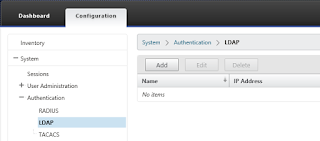
Whenever I'm called to setup or troubleshoot Citrix NetScaler performance issues, I try to bring Citrix InSight Center into the game. InSight Center is a Linux based Virtual Machine which gathers AppFlow performance data from the NetScaler thus helping with performance troubleshooting. I am not a fan of local user accounts on any system for many reasons, so I'll show you how to delegate the user authentication of the InSight Center to Active Directory. Let's start with logging on to the InSight Center using the default administrator account "nsroot" and navigating to the "Authentication" node under "System". Here we see all the available authentication methods supported: RADIUS, LDAP and TACACS. Since we want to delegate the authentication to Active Directory, we're interested in LDAP. Select the "LDAP" methods, and then click "Add" to add a server. Fill in the IP address of a domain controller (or a Load Bal...

Powershell Event Log Filtering

I run across a fairly old Powershell script today that I had to use in order to get some information from the Security log of a Domain Controller. The domain controller has been around for a long time and the log was a bit large. I run the script once and it took forever to complete so I decided to take a look under the hood... First of all the script was using the Get-EventLog cmdlet which isn't the best thing... I examined the script for the event id's of the entries we would like to get and then I replaced the Get-EventLog and Where-Object cmdlets with the Get-WinEvent and the XML filter for the events. You may wonder, how are we going to build the XML filter for the WinEvent? Well, I'll show you a little trick. First we open Event Viewer, select the log and then select "Filter Current Log". A window will pop up and you'll have to fill the necessary fields. Wait, don't hit "OK" yet, switch to the XML tab and copy the query text. Nex...

Powershell Property Rename

Image
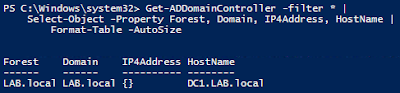
When using Powershell, we sometimes have to change the names of the properties returned by a cmdlet. There are many reasons for doing this, take exporting data as an example. You want to export an array of objects and set custom property names in order to format it as requested. Another important reason for changing the name of a property it passing objects down the pipeline. When using the pipeline, the property may be named differently that the parameter name for the next command. You'll run into this kind of problems when using cmdlets from differents modules like ActiveDirectory and Exchange. A property may be named "ComputerName" for an AD cmdlet and "Server" for an Echange cmdlet. Let's see what you can do about it... For example, we want to test network connectivity on port 389 towards all domain controllers. First we will get the list of the domain controllers using the cmdlet Get-ADDomainController and then we will test connectivity using Tes...

Windows Server 2012 R2 Evaluation Upgrade

Image
Sometimes you just have to fire up a Windows Server system in order to test something and if you're like me, you'll create a new virtual machine for this purpose. Most of the times, I create a VM using an evaluation copy of Windows Server since the evaluation period is more than enough and the client may not have the necessary license. There are times however when I had to license an evaluation copy! So, let's cut to the chase! I used the DISM tool to get the current edition of the OS and the supported target editions and perform the upgrade. Start by opening an elevated Powershell window and run the command: dism /online /get-currentedition   From the output you can see that the server is running ServerStandardEval edition.   Let's get the supported upgrade editions by running:   dism /online /get-targeteditions     and since ServerDatacenter is supported, will upgrade to that using:   dism /online /set-edition...

Powershell COM Object Disposal

I run into a strange issue with one of my Powershell scripts the other day, I was using an Excel COM object and I had an Excel process even after calling the objects Quit() function. All the script was doing was to open an Excel xlsx file and save it as csv file. I could use the Get-Process and Stop-Process cmdlets be I would like to be able to schedule the script to run and not be afraid that it would kill any other Excel processes running at the same time. After a few searches I found out that I could release the COM object with the following command: [System.Runtime.Interopservices.Marshal]::ReleaseComObject($excel) Here we are releasing the COM object excel using the Interopservices. Before doing this, make sure that you have saved your work done using the COM object.